
For over 20 years, we’ve seen organizations treat digital wayfinding and internal communications as two separate silos. In one corner, you have the facilities team managing maps and kiosks. In the other, the HR or marketing department is trying to figure out how to get staff and visitors to actually read company updates.
Here is the truth: If your wayfinding kiosks are only showing maps, you are wasting valuable real estate.
At Norvision, we specialize in building the "information backbone" for complex environments like hospitals, corporate campuses, and major transit hubs. Integrating digital wayfinding with your internal communication strategy doesn't just help people find Room 302: it transforms your physical space into a dynamic, responsive communication network.
Why Your Wayfinding Should Do More Than Give Directions
Think about the high-traffic areas in your building. Lobbies, elevator banks, and main corridors are where people naturally pause. By using interactive displays that serve dual purposes, you ensure that your most important messages are seen by the right people at the right time.
Don't get caught up in the "it’s just a map" mindset. Modern digital signage internal communication allows you to broadcast tailored messages across your entire venue without adding clutter. Whether it’s a hospital needing to communicate new safety protocols or a corporate office highlighting a town hall meeting, your wayfinding kiosks are the perfect delivery vehicle.
The Power of the "Split-Screen" Strategy
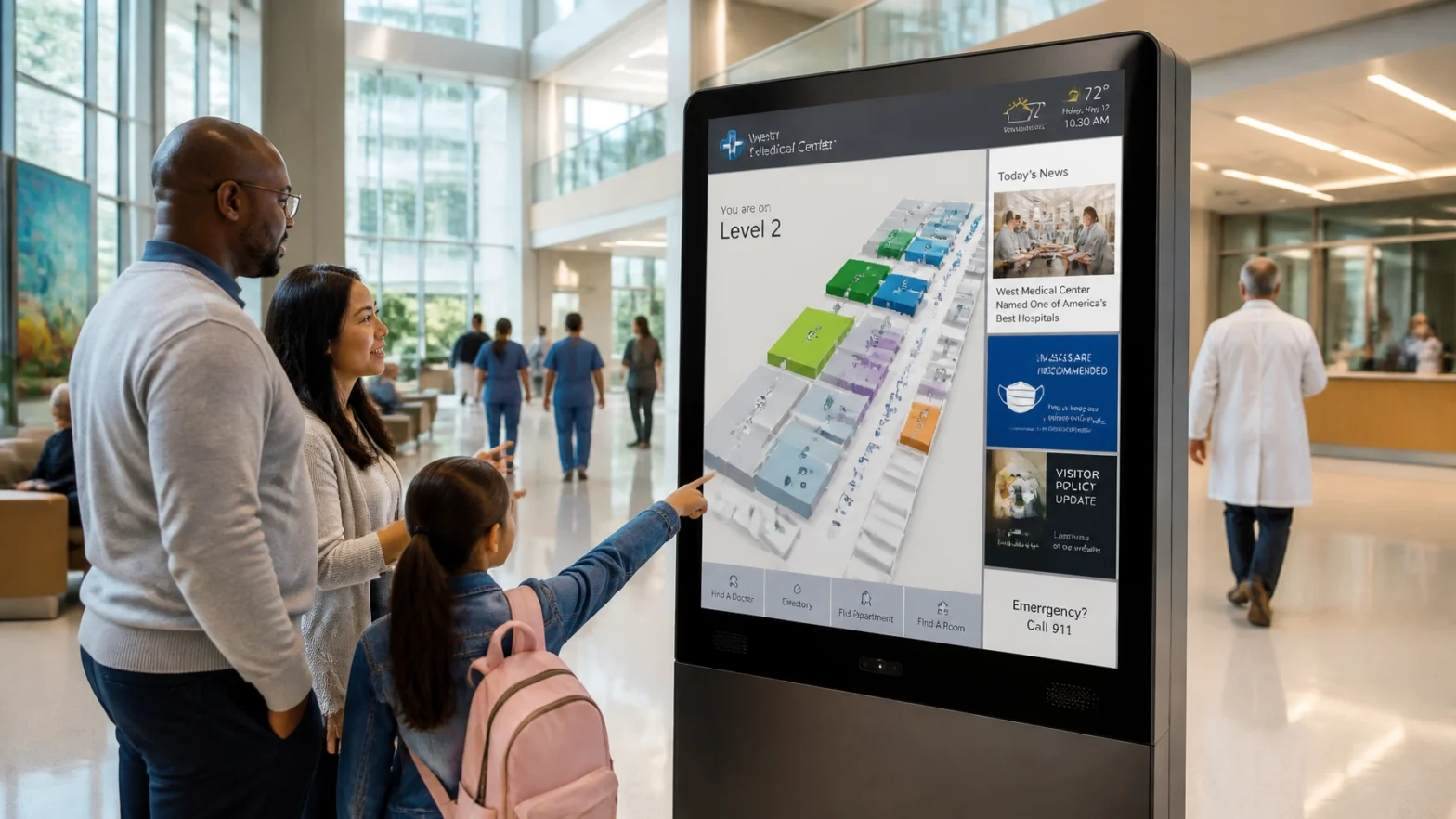
One of the most effective ways to integrate these two worlds is through modular screen design. While 70% of the screen might be dedicated to an interactive 3D map, the remaining 30% can be a rotating feed of:
- Real-time campus news and event reminders
- Employee or donor recognition spotlights (like our digital donor walls)
- Health and safety tips or facility updates
- Live weather, traffic, or transit data

Transforming Kiosks into Internal Communication Powerhouses
When you bridge the gap between navigation and communication, you solve multiple problems at once. Let’s look at how this applies across different sectors.
In Healthcare Facilities
Hospitals are high-stress environments. Patients and visitors are often anxious, and staff are consistently overworked. Integrated signage reduces this friction.
- Reduce Staff Interruptions: Every time a nurse stops to give directions, it’s time taken away from patient care. Digital kiosks handle the "where do I go?" so staff can focus on the "how are you?"
- Wait Time Management: Integrate your queue data into your wayfinding screens in waiting areas to manage expectations and lower perceived wait times.
- Wellness and Calming Content: Use your network to display calming visuals or information about immersive features like Digital SkyLites.
In Corporate Offices and Campuses
For corporate environments, the goal is often engagement and culture-building.
- Visitor Onboarding: A visitor signs in and the kiosk immediately shows them the way to their meeting room while also displaying a "Welcome" message and the company’s latest quarterly highlights.
- Space Utilization: Link your interactive displays to room-booking systems. Not only do employees find the room, but they can see if it’s currently occupied or available for a last-minute sync.
- Culture at Scale: Use screens in lounges and breakrooms to highlight team wins, new hires, and upcoming social events.

The Core Benefits of a Unified Strategy
Integrating these systems isn't just a "nice to have." It has a direct impact on your operational efficiency and bottom line. According to research on workplace communication, companies with highly effective communication practices see significantly higher levels of employee engagement and productivity.
1. Enhanced Real-Time Safety and Emergency Alerts
This is the most critical benefit. In an emergency, your wayfinding system needs to change instantly. A unified system can override every screen in the building to show evacuation routes, emergency instructions, and safety zones.
- Visual Direction: Instead of just hearing an alarm, people see a flashing map showing them the safest path out of the building based on the location of the incident.
- Consistency: Every screen: from the lobby kiosk to the public signage in the cafeteria: displays the same life-saving message.
2. Improved Visitor and Employee Experience
Navigation is about more than points on a map; it's about the feeling of being guided. When a visitor feels informed and "in the loop" regarding what’s happening in the building, their overall satisfaction scores increase. Keep it simple. Seeing a theme? Information equals comfort.
3. Data-Driven Insights
By monitoring how people interact with your kiosks, you gain invaluable data. Are people frequently searching for a department that moved six months ago? Are they getting "lost" at a specific corridor? This data allows Facilities and Communications teams to adjust their strategies in real-time.

5 Practical Steps to Integration
Ready to merge your navigation and communication? Follow this roadmap:
- Select a Unified CMS: Stop using three different software platforms. You need one cloud-based Content Management System (CMS) that can push maps, video, and text to every screen in your network.
- Define Your Content Zones: Don't clutter the map. Designate specific areas of the screen for "Navigation" and "Communication." This ensures the map remains functional while the message remains visible.
- Integrate with Third-Party Data: Connect your signage to your existing tools: Outlook for room bookings, HL7 feeds for hospital data, or CAP (Common Alerting Protocol) for emergency services.
- Prioritize Accessibility: Ensure your digital wayfinding is ADA and WCAG compliant. This includes high-contrast modes, audio guidance, and multi-language support. Communication is only effective if everyone can access it.
- Establish Governance: Who owns what? Make sure your Facilities team is responsible for map accuracy while the Marketing/HR team handles the internal messaging schedule.
Avoiding Common Pitfalls
Make sure to avoid the "set it and forget it" trap. A digital signage network is a living thing.
- Don't Keyword Stuff Your Content: Keep messages brief and actionable.
- Keep Maps Current: Nothing kills trust in a digital system faster than a map that leads to a closed-off hallway.
- Don't Overload the Screen: If there are 15 different things moving on the kiosk, people will ignore it. Keep the design clean and professional.
Why Norvision is Your Strategic Partner
Building these complex, integrated solutions is what we do. We aren't just selling screens; we are designing experiences. With over two decades of expertise, Norvision offers a modular architecture that seamlessly blends hardware, software, and creative content.
Our about-us page highlights our commitment to 24/7/365 monitoring and support. We understand that in a hospital or a corporate HQ, downtime isn't just an inconvenience: it’s a failure of communication.
We handle the heavy lifting:
- Professional Installation: Across all 50 states.
- AI & Data Assessment: We help you understand traffic patterns before we even install a screen.
- Custom Creative: We design interfaces that reflect your brand and speak to your specific audience.
Ready to elevate your facility?
Don’t let your screens stay static. Turn your wayfinding kiosks into the most powerful tool in your internal communication arsenal.
Contact Norvision today to schedule a consultation and see how our interactive displays can transform your space.